Reading text
| Site: | Optima Project |
| Course: | Mentors Course - EN |
| Book: | Reading text |
| Printed by: | Guest user |
| Date: | Sunday, 4 October 2026, 3:04 AM |
Description
4.Organising digital training
Table of contents
- 4.1 Being able to support participant engagement during online training
- 4.1.1 Being able to support learners engagement during online training
- 4.1.2 Identifying difficulties: signals to monitor and strategies to prevent them
- 4.1.3 Resolution of possible conflicts
- 4.1.4 The Importance of Breaks and Attention Management in Online Courses
- 4.1.5 Motivation and Encouragement: How to Maintain Student Motivation
- 4.2 Learning Assessment
- 4.3 Ongoing Support and Critical Issue Management
4.1 Being able to support participant engagement during online training
4.1 Being able to support participant engagement during online training
4.1.1 Being able to support learners engagement during online training
Engaging participants in digital environments requires planned strategies that address the three dimensions of learning: cognitive, emotional, and behavioral. This chapter provides mentors with practices to foster engagement, maintain motivation, monitor participant well-being, and manage the challenges typical of digital learning contexts. Practical techniques inspired by educational psychology, digital learning research, and real-world scenarios will be explored.
Mentors are not only required to deliver training, transferring skills and knowledge to participants, but also to identify potential issues and intervene appropriately to encourage the active participation of all involved, ensuring a quality learning experience.
Participant engagement is a multidimensional construct that includes:
Cognitive Engagement: the mental investment in learning tasks, including critical thinking, problem-solving, information processing, and making connections between new and prior knowledge. This is evident when learners are actively trying to understand, analyze, and synthesize information.
Emotional Engagement: the affective reactions to the learning experience, such as interest, curiosity, enjoyment, a sense of belonging, but also boredom, frustration, or anxiety. Positive emotional engagement is crucial for sustained effort and a sense of accomplishment.
Behavioral Engagement: observable participation in learning activities and interactions. This includes active participation in discussions, completion of assignments, attendance at virtual sessions, asking questions, and collaborating with peers.
These dimensions are well-documented in the literature, particularly in the work of Kahu (2013), who categorizes engagement into behavioral, psychological (cognitive and emotional), and sociocultural domains.
In online contexts, engagement is profoundly influenced by factors such as:
- Digital literacy: participants' level of familiarity and skill in using digital tools and platforms.
- Instructional Design: the clarity, relevance, and interactivity of learning materials and activities.
- Social presence of instructors and peers: the feeling of connection and interaction within the online community, which can mitigate feelings of isolation (e.g., https://eric.ed.gov/?q=online+social+presence+engagement&id=ED527588).
- A key distinction: compared to in-person training, online environments require a more conscious effort on the part of mentors to observe and sustain engagement. Nonverbal cues (such as body language or facial expressions) are often absent or muted, making it more difficult to assess the participant's understanding or emotional state. This requires a proactive and adaptable approach to monitoring and support.
Mentors are not only called upon to provide training and therefore transfer their skills and knowledge to workers, but must also be able to identify any critical issues and intervene appropriately to encourage the active participation of all participants, in order to ensure a quality learning experience.
4.1.2 Identifying difficulties: signals to monitor and strategies to prevent them
As we've already mentioned, remote mentoring facilitates the training of workers with time constraints and logistical challenges. But distance, which makes mentoring so accessible and flexible, can also introduce significant complexity. Recognizing and promptly addressing emerging difficulties in these training courses is crucial to ensuring their success.
The ability to identify early signs of discomfort or ineffectiveness in a remote mentoring relationship is the first step toward problem-solving. These signs can be subtle or obvious, but they all indicate that something isn't working as expected.
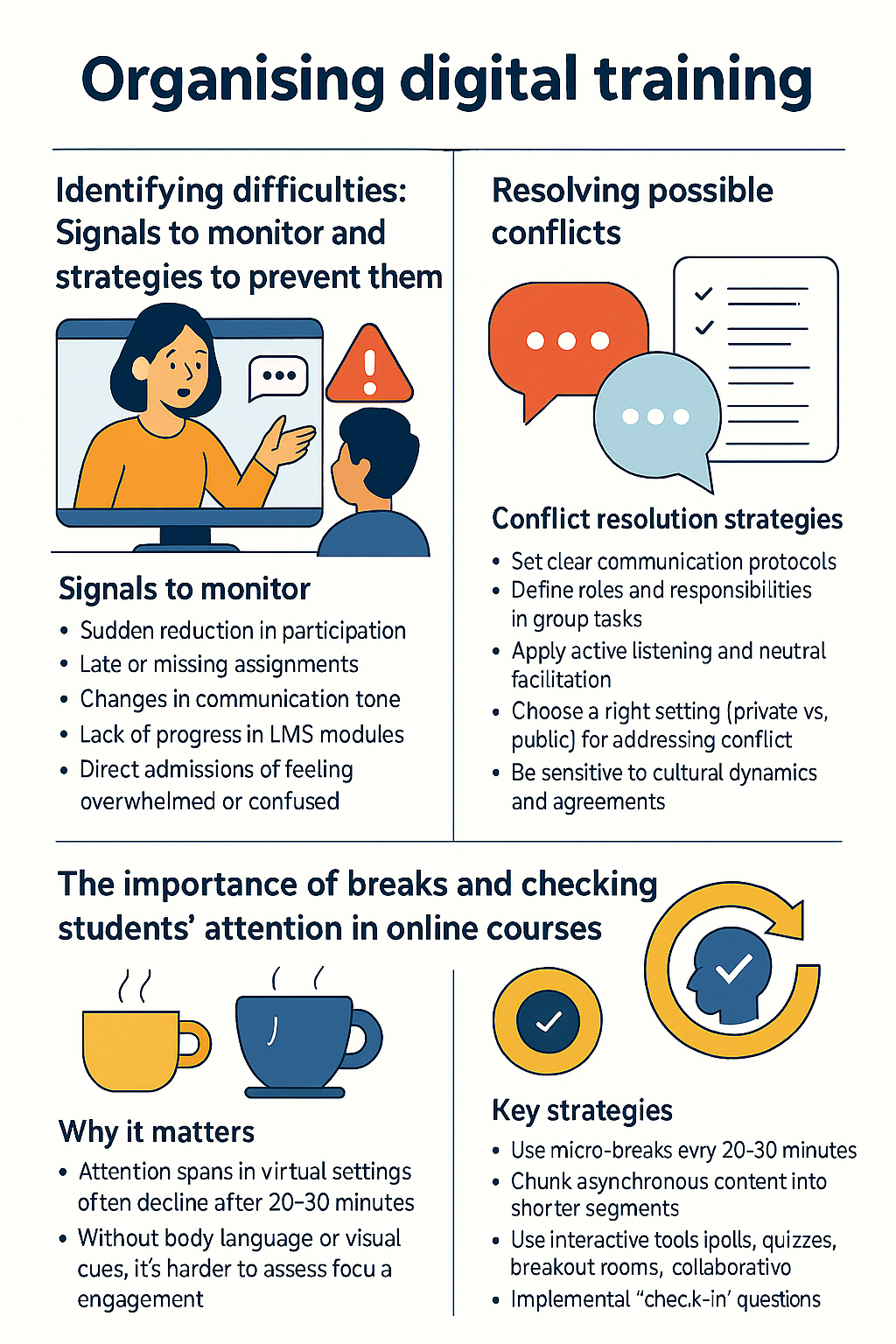
Signs to monitor:
- Sudden reduction in participation, including silences during discussions or cameras being turned off.
- Late or missed submissions of tasks, especially if they represent a change from previous behavior.
- Changes in the tone of communication, such as vague, brief, or emotionally charged messages.
- Lack of progress in modules uploaded to the learning management system (LMS), evidenced by suspended tasks or a lack of interaction.
- Direct admissions of feeling overwhelmed or confused.
Once the signs are identified, it's crucial to take action. Even better, you can adopt proactive strategies to prevent these difficulties from emerging.
Preventative Strategies: Mentoring and Best Practices
- Pre-module Assessment: conduct short surveys or ice-breaking activities to understand participants' previous online learning experiences, their level of digital familiarity, and expectations.
- Set Clear Expectations: explicitly communicate what active participation means in the online context (e.g., "Attendance at least twice a week and always with your camera turned on").
- Foster Psychological Safety: create an environment where participants feel free to ask questions, make mistakes, and express concerns without fear of judgment.
- Use a Variety of Engagement Strategies: offer a mix of individual, small-group, and plenary activities to address different learning preferences and maintain interest.
- Collect regular feedback: use quick surveys, anonymous questionnaires, or direct questions to monitor participants' cognitive and emotional state.
Other intervention strategies for mentors:
Regular and varied check-ins:
- Individual "coffee chats": offer optional, short 10–15-minute meetings to discuss participants' progress, challenges, and overall well-being.
- Small group discussions: facilitate small group discussions to encourage participation from more reserved participants who may be reluctant to engage when their classmates are present.
- Automatic reminders: use the learning platform's features to send automatic reminders about upcoming deadlines or encouraging messages.
Anonymous feedback tools:
- Proposal box: create an online proposal box or anonymous survey to allow participants to express concerns without being identified.
- Plus/Delta feedback: periodically ask participants what is working (plus) and what could be improved or changed (delta) within a distance learning course.
Adapting pacing and flexibility:
- Flexible deadlines (within reason): whenever possible, offer flexibility in delivery, especially for projects, to accommodate unexpected challenges.
- Break down content: break complex topics into smaller, manageable units to reduce cognitive overload.
- Offering options: allow participants to choose from different ways to demonstrate their understanding (e.g., written assignment, video presentation, audio recording).
Creating a psychologically safe environment:
- Promoting a growth mindset: Reinforce the idea that challenges are learning opportunities and that mistakes are part of the journey.
- Normalizing asking for help: Explicitly state that it's normal to have difficulties and encourage early requesting support.
- Active listening: When participants express difficulties, listen empathetically, without judgment, and validate their emotions.
- Sharing resources: Actively provide information about available support services (e.g., academic tutoring, psychological support, technical assistance).
4.1.3 Resolution of possible conflicts
Conflicts in digital learning environments can arise due to the specificities of online communication and the diversity of participants' backgrounds. Effective conflict management is essential to maintaining a positive atmosphere in the course.
Common sources of conflict in online contexts:
Technical issues: Connection, platform, or difficulty using tools can negatively impact interpersonal relationships, generating frustration.
Interpersonal Misunderstandings:
- Tone in Written Communication: Textual communication lacks nonverbal cues, which can lead to misunderstandings about tone (e.g., sarcasm, blunt sentences).
- Lack of Context: Messages can be taken out of context, leading to misinterpretations of intentions.
- Different Communication Styles: Some participants prefer direct communication, others indirect.
- Cultural Differences: Different expectations and norms regarding communication, collaboration, feedback, and authority can cause misunderstandings and conflicts.
- Group dynamics: Unequal participation, passive attitudes, or personality conflicts within work groups.
- Unclear expectations or roles: Ambiguity in instructions, assigned roles in collaborative projects, or evaluation criteria.
Effective conflict resolution strategies for mentors:
Preventative actions:
- Establishing clear communication protocols: Before conflicts arise, define explicit guidelines for respectful online interaction (e.g., "Always assume good intentions," "Criticize ideas, not people," "Use clear and concise language").
- Netiquette guidelines: Provide a document describing expected behaviors in online discussions and collaborations.
- Define group roles and responsibilities: In collaborative projects, clarify roles and tasks to reduce ambiguity and potential conflict.
Mediation techniques (when a conflict arises):
Active listening: listen carefully to all parties involved, seeking to understand their perspectives and underlying concerns. Use empathic listening to validate emotions.
Reframing: help the parties express their positions more neutrally and objectively, focusing on common interests rather than rigid positions.
Neutral facilitation: maintain impartiality and encourage constructive dialogue.
Private or public resolution: assess whether the conflict should be addressed privately or in small groups, avoiding unnecessary public exposure.
Focus on solutions: guide the parties towards shared and realistic solutions, promoting compromise and mutual understanding.
Clear communication and documentation:
Summary of agreements: clearly summarize agreed-upon solutions or actions to be taken.
Documentation of interactions: keep track of mediation interventions, especially in the case of recurring issues.
Cultural sensitivity and awareness:
Promote intercultural understanding: encourage participants to reflect on and appreciate differences in communication styles and cultural norms.
Addressing stereotypes: be prepared to address any instances of cultural insensitivity or stereotyping that arise during discussions.
Intercultural communication training (optional): consider offering concise information or insights into effective communication between different cultures in online contexts.
Escalation pathways: Even during an online learning process, it's crucial to know when to escalate a conflict to a higher level (e.g., academic advisor, program coordinator), especially if the conflict becomes unmanageable or involves serious behavior.
These practices are based on conflict resolution theory (Fisher, R., Ury, W., & Patton, B. (2011) Getting to Yes: Negotiating Agreement Without Giving In, Penguin Books) and are supported by research on online collaboration and group dynamics (https://eric.ed.gov/?q=online+collaboration+group+dynamics&id=EJ1171881), which highlights the importance of clear structures, effective communication, and skilled facilitation in managing diverse teams.
4.1.4 The Importance of Breaks and Attention Management in Online Courses
Maintaining attention in online learning is a significant challenge due to factors such as screen fatigue, cognitive overload, and constant environmental distractions. Research suggests that attention spans can significantly decline after 20–30 minutes in virtual contexts (for example, in studies on videoconferencing fatigue, such as those cited in online learning pedagogy sources, including some on ERIC:
https://eric.ed.gov/?q=online+attention+span+fatigue&id=EJ1172600).
Mentors can apply the following techniques to counteract fatigue and maintain high energy:
Strategically Use Micro-Breaks
- "Brain Breaks": integrate structured 2–5-minute breaks every 20–30 minutes during synchronous sessions. Breaks can include stretching, drinking, or simply stepping away from the screen.
- Asynchronous content segmentation: break long readings or videos into shorter, digestible units (e.g., 5–10-minute videos instead of 30-minute ones).
Energizing and interactive activities
- Quick surveys and quizzes: use platform-integrated tools (e.g., Zoom polls) to quickly check comprehension and reengage students.
- Think-Pair-Share in sub-rooms: ask a question, allow time for reflection, divide students into small groups for discussion, and then share in the plenary.
- Interactive whiteboards/collaborative documents: use tools like Jamboard, Miro, or Google Docs for brainstorming, concept mapping, or group problem-solving.
- Short debates or role-playing: design short, engaging activities that require active participation and critical thinking.
Effective use of interactive tools
- Chat: encourage the use of chat for questions, comments, and immediate reactions. It's helpful to assign a co-facilitator or participant control of the chat.
- Q&A features: use dedicated tools for structured question management and voting on the most relevant ones.
- Virtual hand raise: promote the use of this feature to take the floor or intervene in an orderly manner.
Attention checks and metacognitive prompts
- Check-in questions: ask questions such as "What's a key concept that's emerged so far?" or "How could you apply this idea?"
- Visual cues: ask participants to use reaction emojis (thumbs up, applause) or "yes/no" answers to check attention and comprehension.
- Improvised quizzes (low-impact): short, ungraded quizzes can be excellent tools for checking attention and providing immediate feedback.
- Summarizing activities: ask participants to summarize the last 5–10 minutes of content in their own words.
The above strategies are consistent with the cognitive load theory (Sweller, J., 1988), which emphasizes the importance of managing the mental effort required of students in order to optimize the processing and storage of information.
4.1.5 Motivation and Encouragement: How to Maintain Student Motivation
Motivation is a key factor in persistence and success in learning in general, but especially in online learning.
It can be distinguished between:
- Intrinsic motivation: driven by internal factors such as curiosity, genuine interest in the subject matter, the desire for personal growth, or the satisfaction of learning a new skill. It is the most enduring form of motivation.
- Extrinsic motivation: influenced by external factors such as grades, certificates, recognition, competition, or the desire to avoid negative consequences. Although less sustainable on its own, it can strengthen intrinsic motivation when the student feels competent and autonomous.
In online learning, maintaining high motivation is particularly important due to the increased risk of isolation, decreased stimulation, difficulty self-regulating pace, and distractions.
Effective Strategies for Mentors: Gamification and Game-Based Learning
Badges and Points: award virtual badges or points for completing modules and/or chapters, actively participating in discussions, or achieving agreed-upon learning milestones.
Leaderboards (with caution): mentors can use them optionally, focusing on individual progress rather than pure competition, or allowing students to track their own progress without comparing it with other learners.
Narrative and storytelling: integrate compelling narrative into learning content to make it more engaging and meaningful.
Challenges and missions: transform learning activities into "missions" with clear objectives and rewards upon completion.
4.2 Learning Assessment
A training program also includes a final assessment. Mentors must therefore be familiar with the most common techniques for assessing learning. Effective assessment is a fundamental pillar of course success as it provides insights into student progress, allows for adapting teaching, and holds participants accountable for their own learning.
4.2.1 Why Assess? The importance of assessment for measuring progress and improving course effectiveness
Purpose and Value of Assessment
- Formative Assessment vs. Summative Assessment
- Assessment Tools and Techniques
- Digital Assessment Tools (e.g., Google Forms, Kahoot, Padlet, LMS-Integrated Tools)
- Engaging Participants in the Assessment Process
- Peer Feedback, Analysis Journals, Self-Assessment Rubrics
The Meaning of Assessment: Beyond the Grade
Assessment in online contexts has multiple critical functions, which go beyond assigning a grade and include feedback, motivation, and instructional improvement. It is crucial for mentors to understand these distinctions.
Formative Assessment
Purpose: to monitor student progress throughout the learning process. Formative assessment provides ongoing feedback, helping mentors improve teaching and students improve learning. It is often referred to as "assessment for learning."
Value: it helps identify gaps early, allows for targeted interventions, guides subsequent instruction, and maintains engagement by showing students where they are and how to improve. It reduces performance pressure, promoting the acquisition of real-world skills.
Online learning examples:
- Quick comprehension surveys: during a live virtual session, after explaining a complex concept, the mentor can launch a survey (e.g., "On a scale of 1 to 5, how confident do you feel about this concept?") to assess overall understanding and identify any difficulties.
- One-Minute Papers/Exit Tickets: at the end of an asynchronous module, students write a short response to questions such as "What is the most important thing you learned today?" or "What question do you have left?" Shared documents or LMS forums can be used.
- Forum discussions: ask open-ended questions in forums to stimulate the application of concepts or personal reflection. This allows the mentor to observe students' cognitive processes.
- Ungraded practice quizzes with immediate feedback: short, low-impact quizzes within the LMS that provide automatic explanations for correct and incorrect answers immediately after submission.
- Concept or mind maps: students create visual representations of the connections between concepts, thus demonstrating their understanding of the relationships between content, using tools such as Miro or Jamboard.
A 1998 study highlighted the significant impact of formative assessment on final learning outcomes, emphasizing its fundamental role in promoting conceptual assimilation and self-regulation and self-evaluation. This work is considered a milestone in educational research.
Summative Assessment
Purpose: to assess student learning at the end of a unit, module, or course, comparing this assessment to an average standard or target. It is often referred to as "learning assessment."
Value: it provides an overall assessment of what students have learned, enables certification or assessment, and provides a sense of accountability to students who often have to self-assess by testing their knowledge fairly.
Examples in online learning:
Online final exam: a timed test, usually best proctored by a mentor, administered via the LMS and covering the entire course content.
Comprehensive project/case study: students apply the concepts learned to solve a real-world practical problem or create a livestock product, to be presented as a document, presentation, or interactive demonstration.
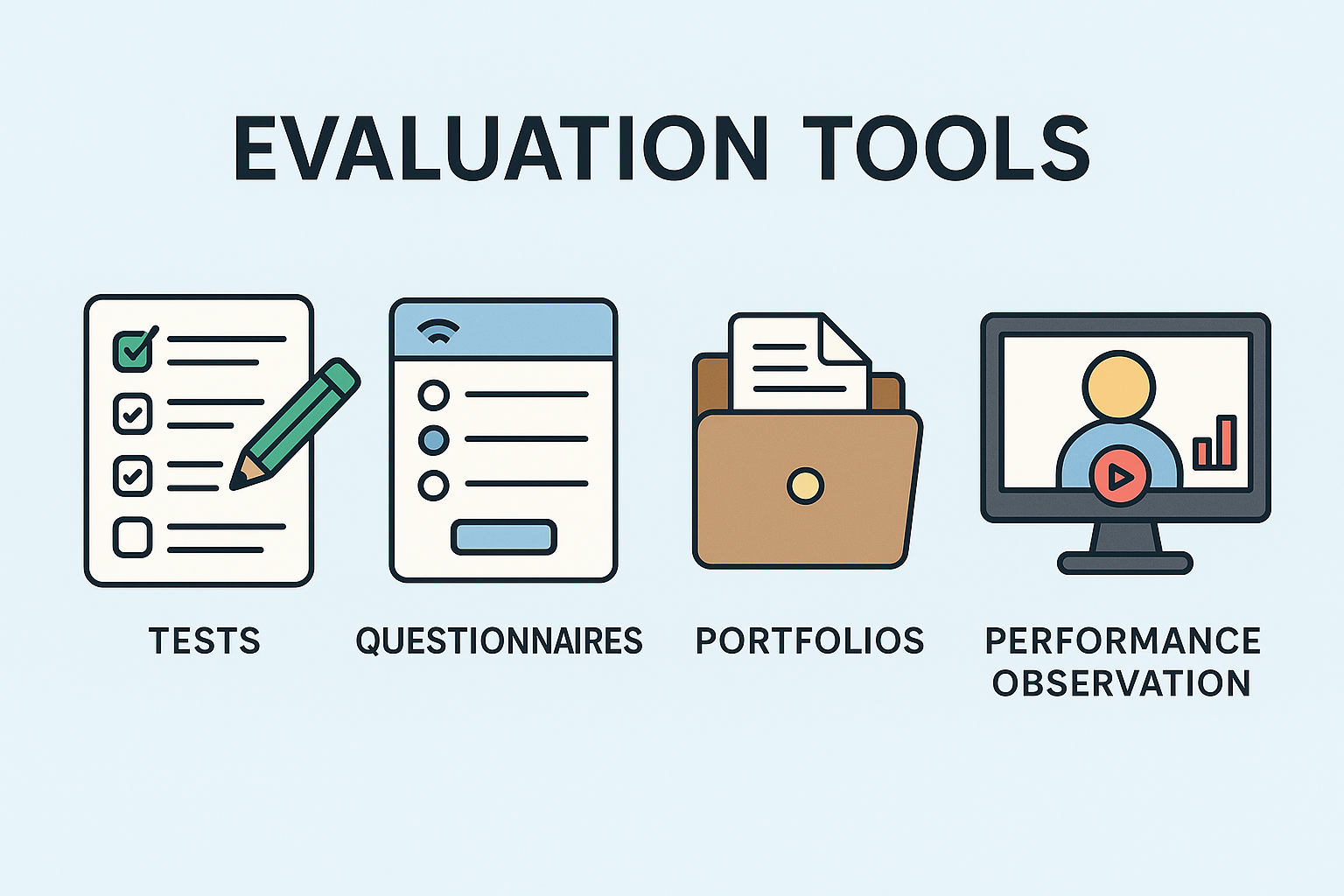
Digital portfolio: a collection of the best work completed by the student during the course, demonstrating progress and mastery over time. It can be hosted on Google Sites or dedicated e-portfolio platforms.
Final presentation/project discussion in a final video conference: students present and discuss their final project via video conference, answering questions from mentors and peers.
4.2.2 Assessment Tools: Tests, Questionnaires, Portfolios, Performance Observation
Tools Integrated into Learning Management Systems (LMS)
Modern LMS platforms (for example Moodle, Canvas, Blackboard, Google Classroom etc…) offer a range of tools that simplify and make assessment more effective:
- Quiz/Tests: Mentors can create multiple-choice, true/false, short-answer, or essay questions. They can set time limits, include question pools, provide automatic feedback, and track results in the gradebook.
- Example: A module on "Digital Marketing Fundamentals" includes weekly quizzes in Canvas to test vocabulary and basic concepts, with immediate feedback.
- Submission of Assignments and Projects: This allows for the submission and grading of documents, multimedia files, and other materials. It often includes integrated rubrics and tools for annotating directly on the assignment.
- Example: Students upload a draft marketing plan to Moodle, and the mentor uses the annotation tools to highlight areas for improvement and assign a score according to the rubric.
- Discussion forums: These assess participation, critical thinking, and communication skills. Mentors can use rubrics to evaluate the quality of contributions.
- Example: A mentor asks students to critically analyze a case study in a Blackboard forum, evaluating the application of theories and interaction with peers.
- Gradebook: A centralized system for tracking grades, calculating final scores, and providing a transparent overview of progress.
- Example: Students can consult the gradebook in Canvas to monitor grades and current course status.
- Analytics dashboards: Many LMSs offer detailed analytics on student activity (time spent in modules, frequency of posts, etc.), useful for identifying difficulties and responding promptly.
Example: A mentor notices through analytics that a student hasn't accessed the course for days and contacts them. This approach falls within the realm of learning analytics (Siemens & Gasevic, 2012).
Digital tools for assessment and interaction
- Google Forms: useful for creating surveys, self-assessment quizzes, and customized feedback forms. Collaborative, versatile, and easily shareable.
Example: a mentor sends a form after a complex session to collect anonymous feedback on unclear points.
- Kahoot!: interactive quizzes and polls with games, ideal for formative assessments and maintaining attention.
Example: at the beginning of a live class, a mentor uses Kahoot! to review the previous week's content.
- Padlet: virtual bulletin board for brainstorming, ideas, questions, or exit tickets. It encourages quick and visible responses, even anonymous ones.
Ex: students post initial project ideas and mentors respond visually to each one.
- Mentimeter/Slido: tools for interactive presentations, live polls, word clouds, and Q&As. Excellent for immediate feedback and interactive discussion.
Example: a mentor creates a real-time word cloud for the question "What is your main challenge in this module?"
- Perusall/Hypothesis: tools for collaboratively annotating documents (PDFs, articles). They encourage active reading and asynchronous discussion.
Example: students read an article on Perusall, leaving comments/questions directly on the text. The mentor immediately identifies critical points/interesting discussions.
- Flip (formerly Flipgrid): a video discussion platform, useful for assessing speaking skills, presentations, creativity, and building a sense of community.
Example: instead of a written text, students record a 1-minute video to introduce themselves and share a learning objective.
- Online whiteboards (Miro, Jamboard): ideal for collaborative brainstorming, problem-solving, concept maps, and visual projects, assessed for comprehension and teamwork.
Example: a group designs a workflow in Miro, and the mentor evaluates their comprehension and collaboration.
Actions and Best Practices for Mentors
- Match the tool to the learning objective: choose the tool best suited to the type of evaluation. Avoid tools that are simply "innovative": they must add concrete value.
- Provide clear instructions/support: explain to users how to use the tools and what is expected of them (format, content, participation). Short video tutorials can help.
- Assessment methods: combine individual and group assessments: written/oral, practical/theoretical. This supports different learning styles, maintaining motivation.
- Automate when possible: use self-assessment functions for simple quizzes or surveys to devote more time to qualitative feedback on complex tasks.
4.2.3 Self-assessment, co-assessment and ongoing assessment: involving students in the assessment process
Peer Feedback
Mechanism: students can provide constructive feedback to their classmates on assignments, projects, or forum posts. This activity can be done using LMS peer review tools, shared documents, or dedicated platforms.
Value: develops critical thinking, analytical skills, and empathy. Offers diverse perspectives on content and teaches effective feedback delivery. Peer feedback can sometimes be more immediate and understandable than that of a mentor.
Implementation Methods:
Structured Rubrics / Guiding Questions: provide clear rubrics or guiding questions to make feedback targeted and consistent with learning objectives.
Examples: "Does the introduction clearly state the main point?", "What is the strength of this paragraph?", "What part could be clarified better?"
Training and Modeling: offer short training activities on how to give and receive effective feedback, emphasizing a constructive, specific, and supportive tone. Mentors can demonstrate examples of good feedback.
Anonymity (optional): mentors will have to decide whether feedback will be anonymous or attributed, depending on the topic and the level of psychological safety of the group.
Scientific references: scientific research has confirmed the benefits of peer feedback in improving learning and self-regulation.
Reflective Journals / Learning Logs
Mechanism: learners regularly write or record reflections (for example text, audio, video) on their learning experiences, challenges, insights, and connections between concepts. These can be private (between mentor and student) or shared between mentor and small group of students.
Value: promotes metacognition, awareness, and critical reflection on one's own online learning journey. It helps identify strengths and weaknesses, monitor growth, and plan next steps. It also offers mentors a window into students' difficulties.
Implementation Method:
Clear Prompts: Provide specific reflection prompts.
Examples: "What was the most difficult concept this week and why?", "How does this module relate to your personal experience?", "What new questions emerged after reading?", "Describe a lightbulb moment you experienced this week."
Low Evaluation Impact: make clear that the journal is a tool for personal growth and not a formal assessment. Feedback can be qualitative, focusing on the depth of reflection.
Frequency and Format: encourage short, regular contributions (e.g., weekly), and allow for flexibility in format (text, audio, video).
Self-Assessment Criteria
Mechanism: students use the same assessment criteria as their mentors to review their work before submission or to guide revision.
Value: clarifies assessment rules, fosters understanding of quality standards, and allows students to independently identify areas for improvement. It encourages self-correction and the development of critical thinking.
Implementation Methods:
Shared Rubrics: ensure students have access to the rubric from the beginning of the assignment or module.
Co-creation (optional but powerful): where possible, involve students in defining assessment criteria to increase their understanding and sense of responsibility. For example, ask them what makes a piece of work "good."
Guiding Questions for Self-Assessment: provide a framework to guide students through the process.
Examples: "Based on this rubric, what score would you give yourself for each criterion and why? Provide concrete examples." "What changes will you make based on your self-assessment?"
Pre-submission checklist: simplify the rubric criteria into a checklist that students can use before submitting.
Action points and best practices for mentors
Model reflection: share personal reflections on your learning, difficulties encountered, or how you address mistakes. Standardize reflection as an integral part of the educational process.
Provide feedback on feedback: when students practice self- or peer-assessment, provide feedback on the quality of these processes.
Examples: "Your feedback to your colleague was very specific and helpful," "Try adding concrete examples to your self-assessment."
Integrate reflection strategically: ensure that reflective activities are an integral part of the learning process and contribute to learning objectives, rather than simply being "add-ons."
Value growth, not just results: recognize students' commitment to self-assessment, receiving feedback, and continually improving, not just the final grade.
4.3 Ongoing Support and Critical Issue Management
In online learning environments, effective mentoring goes beyond simply conveying content: it includes ongoing support and the careful management of critical situations.
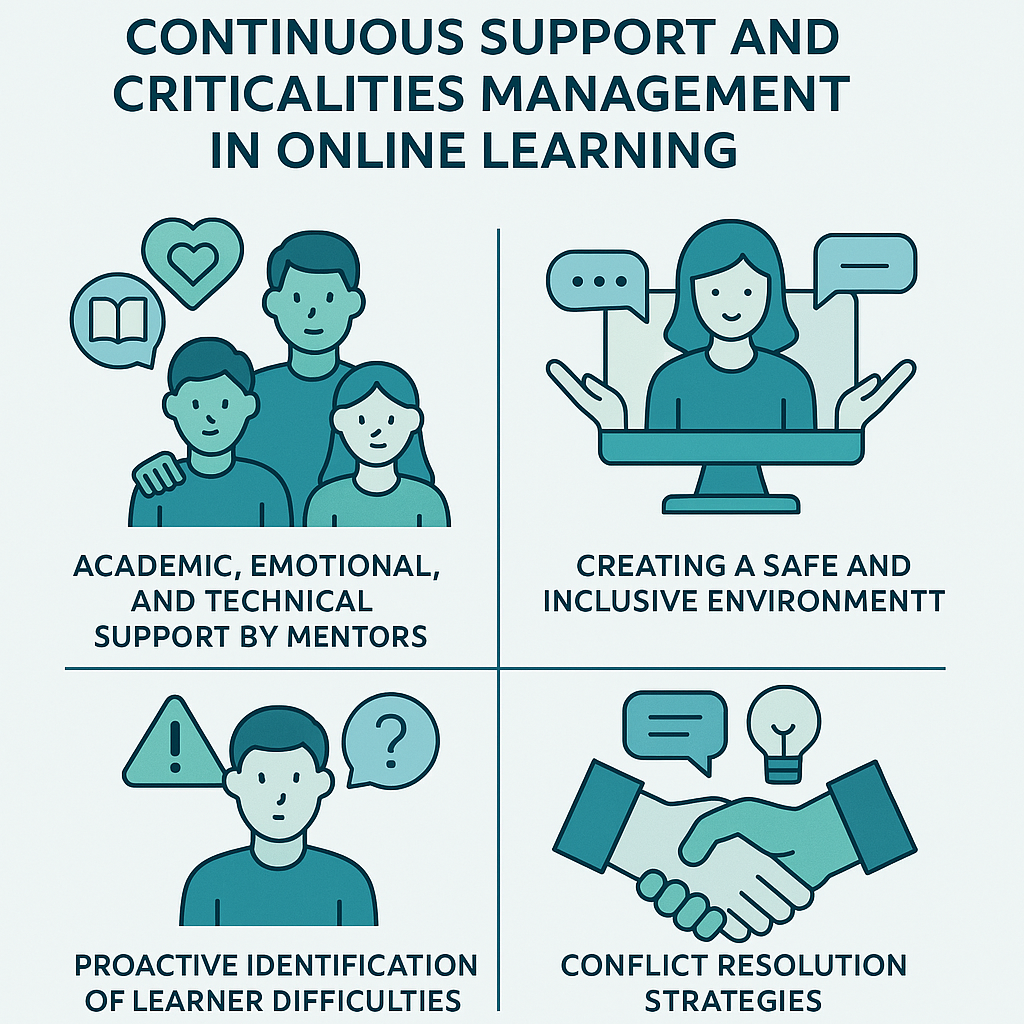
Chapter 3.3 aims to provide mentors with strategies for providing ongoing academic, emotional, and technical support to students, fostering a safe and inclusive environment, actively identifying and addressing difficulties, and managing conflicts before they become unmanageable. Only in this way can a positive and productive learning experience be ensured for all learners.
The success of an online training program depends largely on ongoing, multi-level support provided by mentors/instructors, who must therefore serve as key reference figures, capable of supporting not only the academic aspects of the learning process but also the emotional well-being of students and addressing any technical difficulties.
- Academic Support
Objective: help participants understand contents, acquire skills, and achieve learning objectives.
Value: prevents disengagement, improves learning outcomes, and strengthens self-confidence.
Examples:
Content clarification: organize Q&A sessions via video conference or forums to address complex topics or clarify doubts.
Homework feedback: provide timely, specific, and constructive feedback, explaining what works, what doesn't, and how to improve.
Resource orientation: guide students toward additional reading, video tutorials, or academic support services.
Study strategies: suggest online study techniques, time management, digital note-taking, and effective research.
Case study: A mentor notices common difficulties in solving an analytical task and takes action by organizing an optional in-depth session, sharing some examples with the class to better understand the problem.
- Emotional Support
Goal: support emotional state, strengthen confidence, reduce anxiety, and foster a sense of belonging.
Value: it is essential for maintaining motivation and preventing burnout.
Examples:
Regular check-ins: informal contact via text or email to ask how things are going.
Active Listening: accepting and validating participants' emotions with empathy.
Encouragement: recognizing commitment, progress and resilience, even in difficult times.
Promoting Growth Mindset: Reinforcing the idea that difficulties are opportunities for growth (see Dweck, Mindset, 2006).
Case study: A person writes to express frustration with the workload. The mentor responds with empathy, asking questions to better understand the difficulties and suggesting small steps or access to support services.
- Technical Support:
Objective: Assist in managing digital tools and platforms.
Value: Reduce frustration and ensure equal access to materials and activities.
Examples:
Basic Assistance: guide in resolving common issues (e.g., browser cache).
Orientation to Support Channels: provide the correct contact information for IT support.
Proactive Information: provide instructions and video tutorials before using new tools.
Peer Support: encourage mutual assistance with technical issues in forums.
Case study: if a participant is unable to open a video or download slides, the mentor provides troubleshooting guidance and, if necessary, involves technical support.
- Create a Safe and Inclusive Learning Environment:
Objective: Ensure that everyone feels respected and free to express themselves without fear of judgment or discrimination.
Value: Increases engagement, improves learning, and enriches the exchange of diverse perspectives. In line with the Universal Design for Learning (UDL) model.
Strategies:
Define coexistence rules: co-create or present guidelines for respectful communication
Use inclusive language: choose examples and cases that reflect diversity.
Promote empathy: stimulate reflection on different points of view.
Address microaggressions: intervene promptly and sensitively.
Foster a sense of belonging: use icebreaking or personal sharing activities.
Accessibility: ensure that materials and tools are accessible to everyone and direct them to dedicated services.
Case study: At the beginning of the course, the mentor proposes an activity in which everyone shares a significant cultural aspect, promoting openness and mutual respect.
4.3.1 Identifying difficulties: signs to monitor and strategies to prevent problems
Critical situations in online courses can range from progressive disengagement to the emergence of clear signs of distress. Mentors must have proactive strategies to identify the difficulties and clear protocols for intervening, avoiding potential escalation.
Signs to Monitor
- Reduction in Online Activity: A sudden or sustained decline in log-in frequency, forum participation, or assignment submission.
Most learning management systems (LMS) provide analytics on student behavior.
- Late or Missing Assignments: A recurring tendency to miss deadlines or submit incomplete work, especially if it represents a change from previous behavior.
- Changes in the Tone of Communication: Emails or forum posts that become unusually brief, vague, or express frustration, anxiety, or apathy.
- Poor Attendance in Live Sessions: Camera Always Off, No Response to Direct Questions, or Minimal Participation in Interactive Activities.
- Direct expressions of difficulty: explicit statements by participants that they feel overwhelmed, confused, or struggling.
- Poor performance: a significant and unexplained decline in scores on quizzes or homework assignments.
- Social isolation: shyer participants, consistently avoid group and cooperative work and peer interaction.
Preventive Strategies (Proactive Actions)
- Early and Frequent Feedback: provide regular, specific, and low-stakes feedback on performance and engagement to keep participants informed and motivated.
- Clear Expectations: ensure that task instructions, assessment rubrics, and deadlines are explicit and easily accessible. Ambiguity is a common cause of stress.
- Regular Check-ins: provide ongoing monitoring (e.g., weekly anonymous emotional state surveys or short one-on-one interviews for those flagged by analytics).
- Building Relationships: establish a positive and welcoming relationship with participants from the start, encouraging them to ask for help when needed.
- Flexibility: if possible offer flexibility regarding schedules, deadlines or alternative learning paths, taking into account individual needs or unforeseen circumstances.
Case study: The mentor offers an anonymous survey asking, "How do you feel about this week's content?" ("Secure," "Confused," "Difficult"). If many participants report difficulty, the mentor may decide to organize remedial classes or extra sessions.
Escalation Protocols and Support Networks
Objective: Ensure that all training course participants receive adequate and timely support when a situation exceeds the mentor's expertise or responsibilities.
Value: Protect participants' well-being, ensure compliance with the training provider's policies, and provide mentors with clear and precise guidelines and reference points.
Protocols:
- Persistent Academic Difficulties: if, despite the mentor's support, a participant continues to experience difficulties, it is appropriate to involve the instructor, academic advisor, or course support services.
- Emotional Distress and Mental Health Issues: if someone expresses distress, self-harming thoughts or serious problems, it’s essential to immediately contact counseling services, student office or other contacts (emergency protocol).
- Complex technical issues: direct the participant to the help desk or technical teams and monitor the issue for resolution.
- Inappropriate conduct or plagiarism: report to the instructor, course coordinator, or disciplinary representative, according to the institution's policies.
- Documentation: record interactions, observed signals, and actions taken in a clear, objective, and timely manner (including contact information and timing).
Mentor Support Networks
Mentors must be aware of and able to activate their internal support network:
- Instructor/Course Coordinator: for course-specific teaching/policy issues.
- Program Director or Department Head: for more general issues or critical situations.
- Student Services: for psychological support, disability, inclusion or specific needs.
- IT Department: for technical issues.
- Other mentors: for discussion, peer support and management of complex situations.
Case: a mentor receives an email from an user expressing anxiety and difficulty related to their workload. The mentor consults the protocol for managing distress, contacts the psychological support center, and sends an email to the user to confirm assistance.
4.3.2 Conflict Resolution
Conflicts are inevitable in any learning environment, including online learning. Mentors must therefore possess the skills to prevent, mediate, and resolve disagreements constructively, maintaining a positive and respectful atmosphere. This aspect ties in with Module 1, specifically the topic of psychological safety.
Types of Online Conflicts
- Communication Misunderstandings: misinterpreted tone in messages due to a lack of visual cues.
- Teamwork Problems: unbalanced workload, clashes between different personalities, diverging team expectations.
- Content Disagreements: heated discussions in forums, disrespectful criticism, or non-constructive challenges to others' ideas.
- Cultural Differences: different communication styles, different norms regarding candor, hierarchical respect, or participation.
- Technical Frustration: technological difficulties that result in abrupt, irritable, or aggressive messages.
The Role of the Mentor as Mediator
- Neutrality: approach conflicts impartially, focusing on the problem, not on the users involved.
- Listen: allow all parties to express their points of view.
- Find Common Ground: help the parties find shared interests.
- Rephrasing and paraphrasing: translating emotional or accusatory statements into neutral and objective terms to facilitate mutual understanding and reduce tension.
- Focusing on solutions: guiding users toward practical and shared solutions.
- Setting clear boundaries: recalling the rules of respectful communication and intervening if interactions become personal or offensive.
- Private discussions: it is often helpful to begin mediation with individual discussions before engaging all parties in a direct discussion.
Role-playing and case studies for practice
They offer a safe and risk-free environment where mentors can practice conflict management, improve their communication skills, and gain confidence in handling complex interpersonal situations.
Implementation Methods:
- Case studies: present realistic online conflict scenarios (e.g., "A student accuses another of plagiarism," "A group member never responds," "A student posts a highly critical comment"). Analyze possible causes and propose appropriate responses.
- Role-playing: assign students roles (frustrated or angry student) and act out the scenarios, with the possibility of immediate feedback and repeated practice. Useful for practicing listening, emotion management and constructive communication.
- Debriefing: at the end of each simulation or case study, conduct an in-depth discussion to discuss what worked, what could be improved, and alternative approaches.
Case study: Students participate in a role-play in which one student plays a participant frustrated by the lack of input from a group member. The mentor should use active listening and problem-solving techniques to guide the student toward a solution.
4.3.3 Motivation: How to keep participants' attention high
Maintaining Motivation Over Time
Objective: counteract the natural decline in motivation that can occur during an online course due to isolation, fatigue, or the perception of increasing difficulty.
Value: fundamental to promoting learning consistency, retention in the learning process, and completion of the module or entire course.
Strategies:
- Celebrate Milestones: recognize and celebrate progress, not just final completion. Even small successes deserve recognition (50% of the course done, great!).
- Variety of Activities: Keep the learning experience stimulating by alternating teaching methods, assessment methods, and opportunities for interaction.
- Connect Content to Reality: Constantly remind participants of the practical relevance and application of what they are learning.
- Offer Choice and Autonomy: Whenever possible, give participants the freedom to choose topics, delivery methods, or assignment types. This strengthens intrinsic motivation and a sense of control.
- Foster peer bonding: Encourage and facilitate opportunities for interaction among participants: a sense of belonging and social connection motivates learners.
- Regular and motivating communication: Maintaining a constant presence through announcements, personalized messages, and timely responses. Showing yourself present and involved has a direct impact on participant engagement.
- Feedback loops: Ensure participants feel heard by following up—when possible—on suggestions collected through anonymous surveys or other channels. The fact that their opinions count strengthens motivation.